
Copy Integrated CoursesUpdated 2 months ago
If your Cognella Active Learning courseware is integrated into your learning management system (LMS), you can usually prepare the courseware for a new term by copying your existing LMS course and opening a Cognella activity in the copied course.
To provision the courseware for the next term:
- Copy the existing LMS course shell that contains your Cognella courseware.
- Open the copied course.
- Open any Cognella courseware activity or link in the copied course.
- When prompted, wait for the provisioning message to appear.
This process sends the new course information to Cognella so we can connect the copied course with our system and help prepare student access for the next term.
Some institutions limit who can copy courses in the LMS. If you are unable to copy the course, please contact your LMS administrator or support team and ask them to copy the course shell for the next term. After the copied course is available, open any Cognella courseware activity or link to begin the connection process.
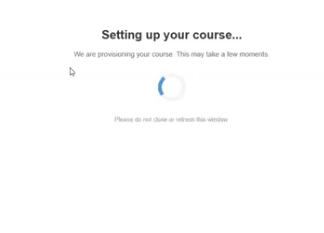
After you open a Cognella activity, you will see a message that the course is being provisioned. This means the copied course is connecting to Cognella.
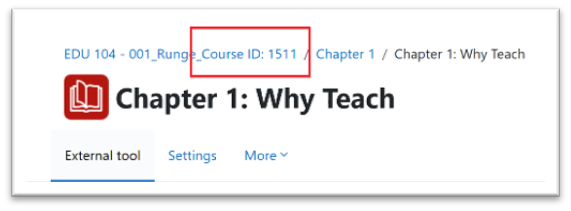
After the course has been successully provisioned, you will see a Course ID at the top of the page. This ID is the connector between Cognella's systems and your LMS. Cognella may ask you to clarify the Course ID after you've copied the course (especially if you have copied for multiple sections or different professors).
Below are links to detailed instructions by LMS. If you have additional questions, reach out to your sales team, or email [email protected].